Thanks for your willingness to review our law firm on Google. There's nothing more meaningful to prospective clients than hearing about your experiences with us. This short tutorial explains how it's done.
1. Google Search the Business You'd Like to Review.
For Hawks Quindel, type in "hawks quindel law firm" and this page should come up: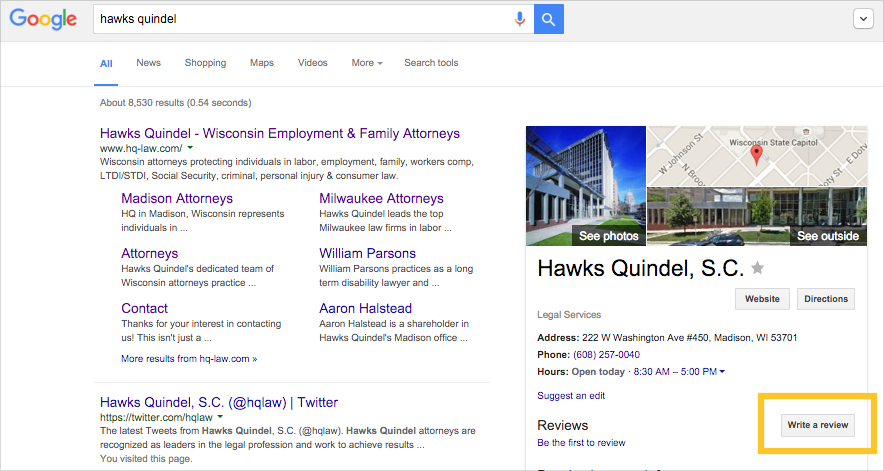 Just click the above screen image to get to the same place.
2. Click the "Write a Review" Button
Find this button at the far-right side of the page, inside the little box containing extra information about the business. You can see this button above, inside the little yellow box. (We added the yellow box here to highlight the button; you won't see it on your screen.) If you are not already signed into Google, a window will pop up for you to do so. If you don't already have a Google account, you can create one now.3. Complete the Pop-Up Review Window
Here's where it all happens. Assign a star rating, then add a few sentences in the text field below.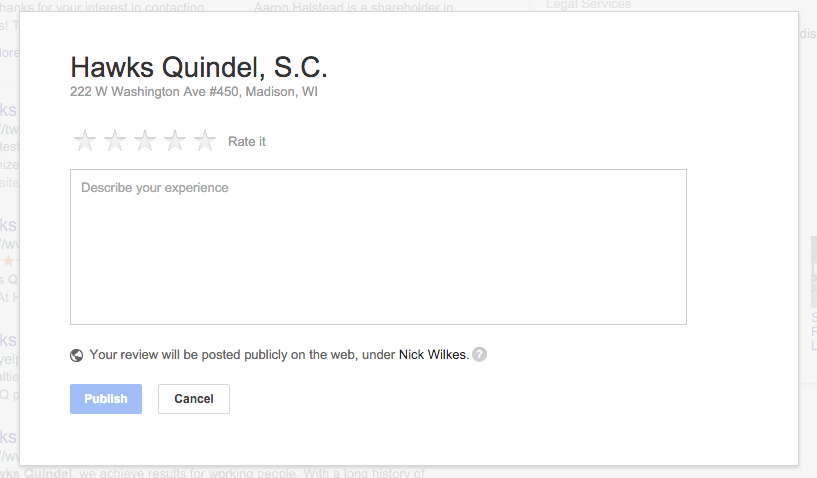 Once you click the blue "Publish" button, you are finished. Thank you so much for taking the time to share your Hawks Quindel experience with others.